Everything you need to take your first home assessment with Task Health
New to home patient assessments? No problem. This guide walks you through the entire process - from opening the app to getting paid.
Watch the full orientation video
Prefer watching over reading? This video covers everything in this guide - from opening the app to completing your first visit.
Your complete introduction
This 5-minute guide will walk you through everything
From understanding what Task Health is to getting paid - here's what we'll cover:
What is Task Health?
How visits come to you
Choosing & confirming a visit
The assessment walkthrough
Sign off & get paid
What is Task Health?
Task Health is the first RN app built specifically for patient home care assessments.
We work with home care agencies and managed long-term care plans that service home care patients. As part of providing care, certain clinical assessments are required - Start of Care, Reassessments, and Supervisory Visits.
Task Health visits aren't about providing patient care - they're about providing clinical assessments. We connect agencies who need these assessments with you, the RNs, to give you a wide range of visits to choose from - whenever and wherever you want.
Totally flexible
You're not required to do any minimum number of visits. Want to do 1 per week or 15? Totally up to you and your schedule.
101 Bedford Ave, Brooklyn
45 Court Street, Brooklyn
880 Nostrand Ave, Brooklyn
New to home assessments? Don't worry.
With our in-app AI-guided tool, you'll complete the assessment like a pro - even on your very first visit.
Go through this 5-minute orientation and you'll understand everything you need to know.
How visits come to you
Agencies send us cases through our main hub. We dispatch them to you based on your availability and proximity.
Once you install our app and become active, you'll start getting push notifications about new patient assessments waiting to be taken.
Task Health
New visit available!
Start of Care at 101 Bedford Ave, Brooklyn - $110
Task Health
New visit available!
Reassessment at 45 Court St - $90
Choosing your visit
You choose when to visit the patient and select the time in the app. We then confirm the visit with the patient and let you know once it's set.
See everything about the visit
Each visit shows you exactly what to expect - the patient, the address, how long it should take, and how much you'll earn. No surprises.
Full address with map
Tap "Map" to see exactly where you're going
Pay rate up front
Know exactly what you'll earn before committing
Choose the day that works for you
Scroll through the available dates and pick the one that fits your schedule. Each date shows the available time window.
Totally flexible
There are no fixed schedules. You pick the day, you pick the time - it's all up to you.
Select start time
Pick the time that works best
Once you tap a day, you'll see available time slots in 15-minute increments. Pick whatever time works for you - no rigid schedule.
The button at the bottom updates to show your selection. When you're happy, tap to move to the confirmation step.
Confirm your selection
Review the date, time, and patient - then tap "Commit & Send Request". Once you commit, we start contacting the patient on your behalf.
Once you commit, it's locked
You can't change the date or time after confirming. Cancellations affect your reliability score, so only commit when you're sure.
Please note!
Committing does not mean the visit is confirmed. The patient still needs to confirm the date and time. You'll receive a notification once the patient confirms - only then is the visit locked in.
Thu, 5 Mar at 4:00 PM
Eusebia Collado
We'll call the patient to confirm. You'll get an update if they confirm, decline, or ask to reschedule.
You can't change this date / time once you commit.
Wait for a confirmation - if there's no confirmation within 1 hour prior to the visit start time, the visit will be canceled automatically
Cancellations reduce your reliability score.
Visit appears on your calendar
After you confirm, the visit shows up on your My visits calendar with a "Pending patient confirmation" status. It's not locked in yet - we're reaching out to the patient.
Orange = waiting
The visit is scheduled but not yet confirmed by the patient
Blue = confirmed
Other visits already confirmed by the patient
We handle the patient confirmation
Our team reaches out to the patient by phone and text to confirm the time you selected. You don't need to do anything - just wait for the notification.
Task Health
Visit confirmed!
Eusebia Collado confirmed your visit for Thu, Mar 5 at 4:00 PM
Task Health
Patient update
Patient requested to reschedule - check your app for new times
Calling patient...
We call and text on your behalf
Patient confirmed!
You're all set - visit confirmed
Once the patient confirms, your calendar updates to "Patient confirmed schedule" and the Clock In / Clock Out time buttons appear. On the day of the visit, open the app and clock in when you arrive.
Task Health
Visit confirmed!
Eusebia Collado confirmed your visit for Thu, Mar 5 at 4:00 PM. You're all set!
Visit confirmed
You're ready to go - clock in when you arrive
That's it!
The whole process - from seeing a visit to having it confirmed on your calendar - takes under a minute.
Visit day - Clock in
When you arrive at the patient's home, open the app and clock in. If you're a few minutes early or late, no worries - the app will ask if you'd like to adjust the visit times. Just tap OK and continue.
Don't stress about timing
Early or late arrival is fine. The app adjusts automatically - just confirm and you're good to go.
Arrived 2 min late - adjust?
101 Bedford Ave, Brooklyn
The assessment - step by step
This is the core of every visit. The entire process is guided, works in order, and is done digitally in the app.
Even if you've never done a home assessment before
Using our app, you will be able to complete the entire assessment successfully - with close to zero mistakes. The AI Co-Pilot guides you through every step.
Your forms dashboard
You'll see the list of required forms. Tap each one to start - progress is tracked automatically.
Required Forms
Patient Assessment
7 sections · ~35 min
Plan of Care
AI-generated · ~5 min
Supervisory Form
Aide observation · ~10 min
Progress
Section 3 of 7
Vital Signs
Step 1 - Medical History & Medications
Start by asking the patient about their general medical history. Then photograph their medications - our AI does the rest.
Medical History
Ask the patient about conditions, prior surgeries, and allergies.
Photo Medications
Snap photos of all medications with your phone. Upload them in the app.
AI Recognizes Meds
The app identifies each medication and suggests matching diagnoses.
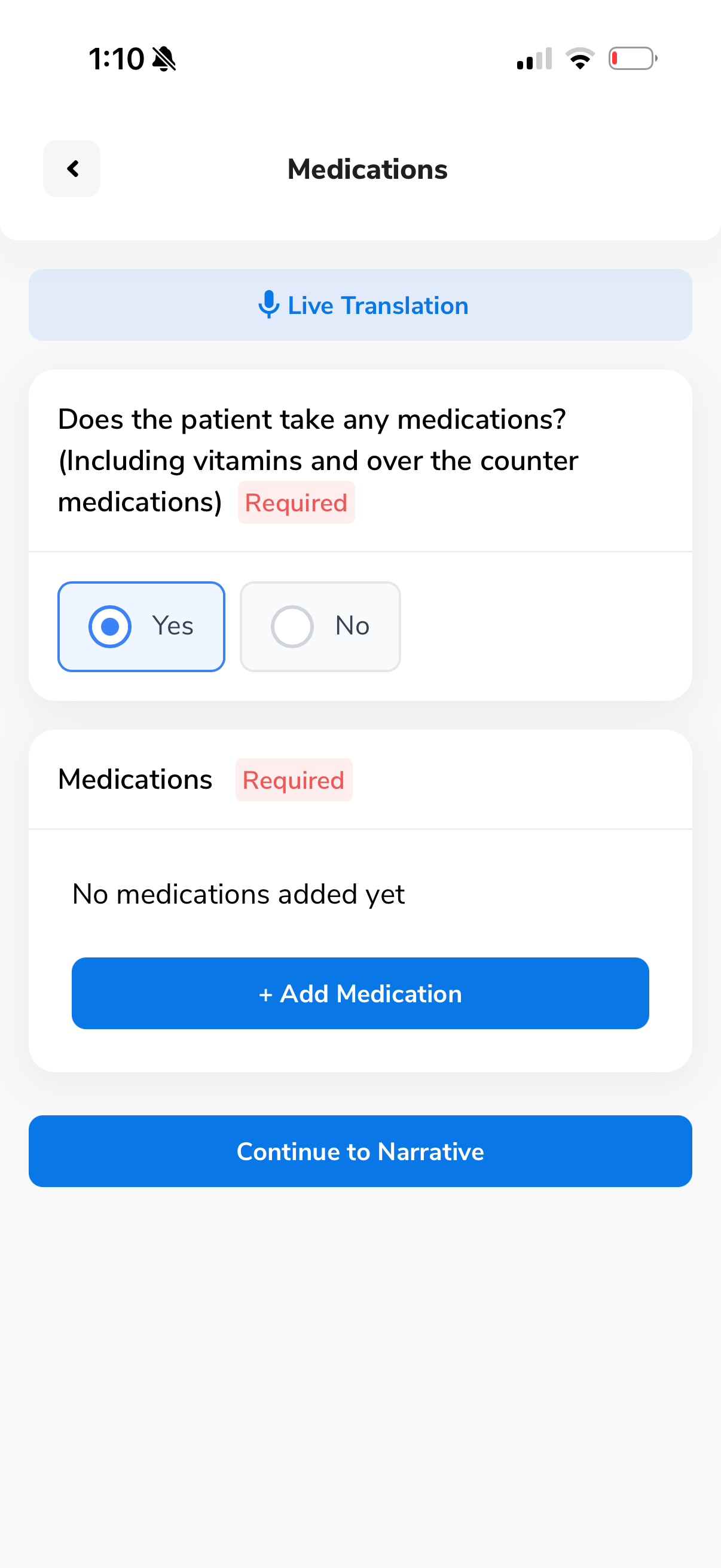
Ask about their medical history
The app walks you through structured questions about the patient's conditions, medications, and medical background. Everything is guided - just follow the prompts.
Voice-to-text built in
Tap the mic icon to dictate - no typing needed
Live Translation
Real-time translation for non-English speaking patients
Photograph the patient's medications
Simply snap photos of all medication bottles. The app will automatically extract each medication name, dose, and frequency using AI.
Just point and shoot
No manual data entry. Our AI reads the labels and fills in everything for you - medication name, dosage, and form.
metFORMIN
500 mg TabFrequency
Twice daily
Route
Oral
Administration Notes
Take with food
Lisinopril
10 mg TabFrequency
Once daily
Route
Oral
Administration Notes
Take in the morning
Atorvastatin
20 mg TabFrequency
Once daily
Route
Oral
Administration Notes
Take at bedtime
AI extracts all medications instantly
From a single photo, the AI identifies every medication and automatically fills in the name, dosage, frequency, route, and administration notes - for all medications at once.
Zero manual data entry
No searching, no typing, no selecting doses. The AI handles all of it from the photo alone.
Just confirm the diagnosis - AI suggests it
The only thing left to do per medication is select the ICD diagnosis code. The AI auto-suggests the right one - just tap to confirm. Once all diagnoses are set, the medication step is complete.
AI auto-suggests ICD codes
For metFORMIN → E11.9 - Type 2 diabetes mellitus
For Lisinopril → I10 - Essential hypertension
For Atorvastatin → E78.5 - Hyperlipidemia
Everything connects
These diagnosis codes are used later by the AI to cross-validate your body systems assessment. It all links together automatically.
metFORMIN
500 mgLisinopril
10 mgAtorvastatin
20 mgStep 2 - Body Systems Assessment
For each body system (Cardiovascular, Respiratory, Neurological, etc.), you follow the same guided loop:
Answer Questions
Select from guided options shown in the app
Add Narrative
Speak freely - the app converts voice to text
AI Diagnosis
We suggest diagnoses based on your answers
Validation
Cross-referenced against all sections & meds
Teaching
AI writes patient teaching based on your findings
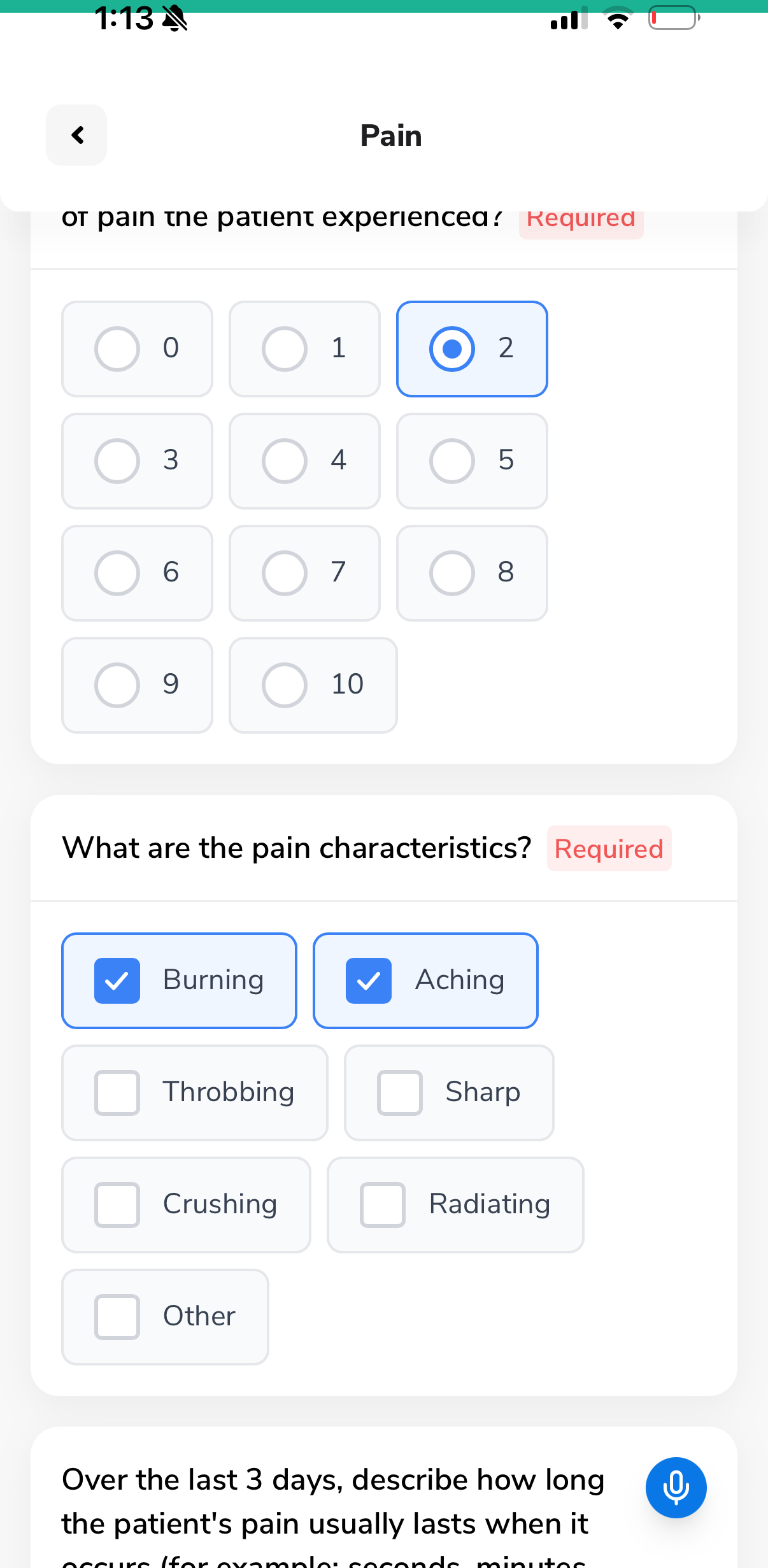
Guided clinical questions
Each body system section presents structured questions - radio buttons, checkboxes, pain scales, and free-text fields with voice-to-text. Just follow the prompts.
No guesswork
Every question is pre-built by clinical experts - you just answer
Voice-to-text everywhere
Tap the mic icon on any text field to dictate instead of type
Tell the story in your own words
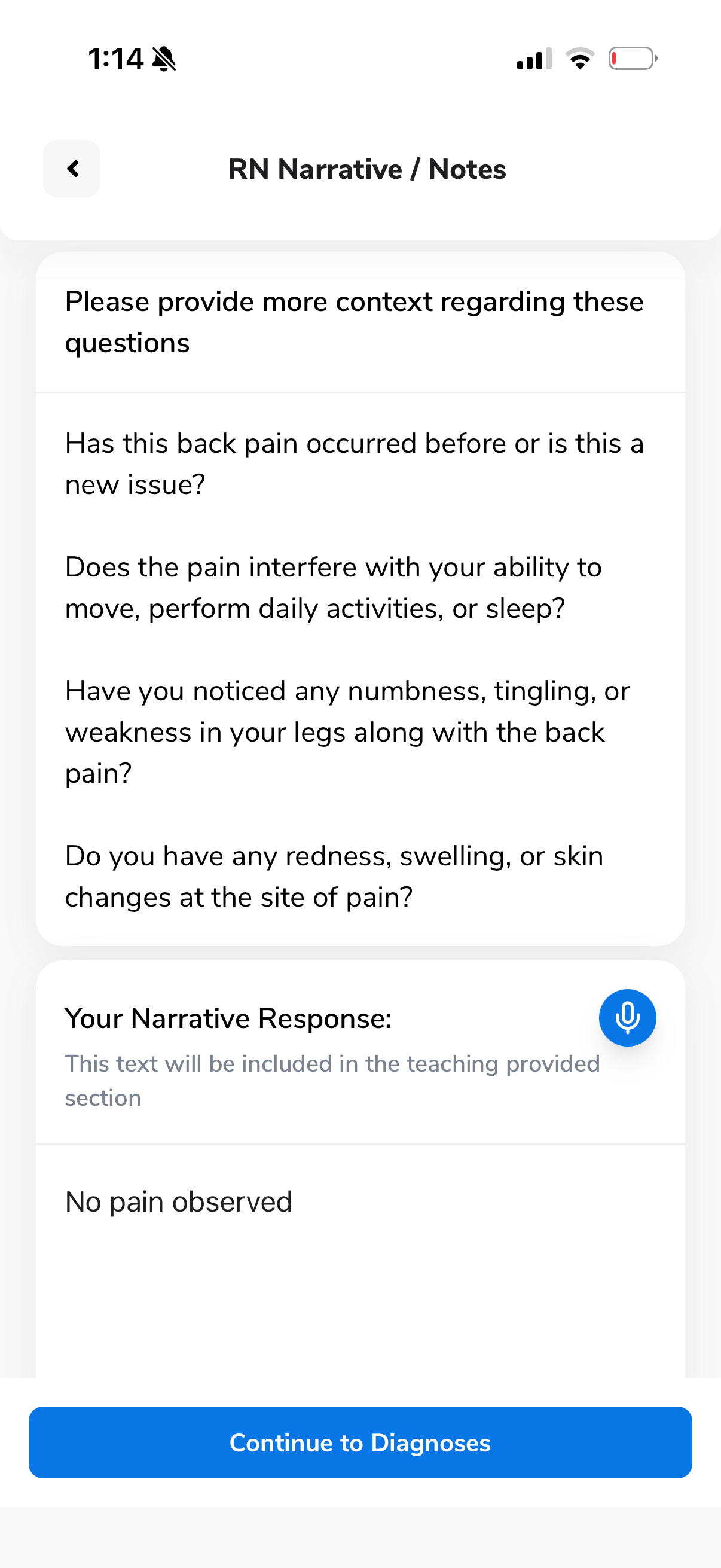
After answering the structured questions, the app asks follow-up questions to help you provide more clinical context. Speak your narrative - the app transcribes it in real time.
Your Narrative Response
This text will be included in the teaching provided section
"No pain observed"
Tap to record - voice is transcribed instantly
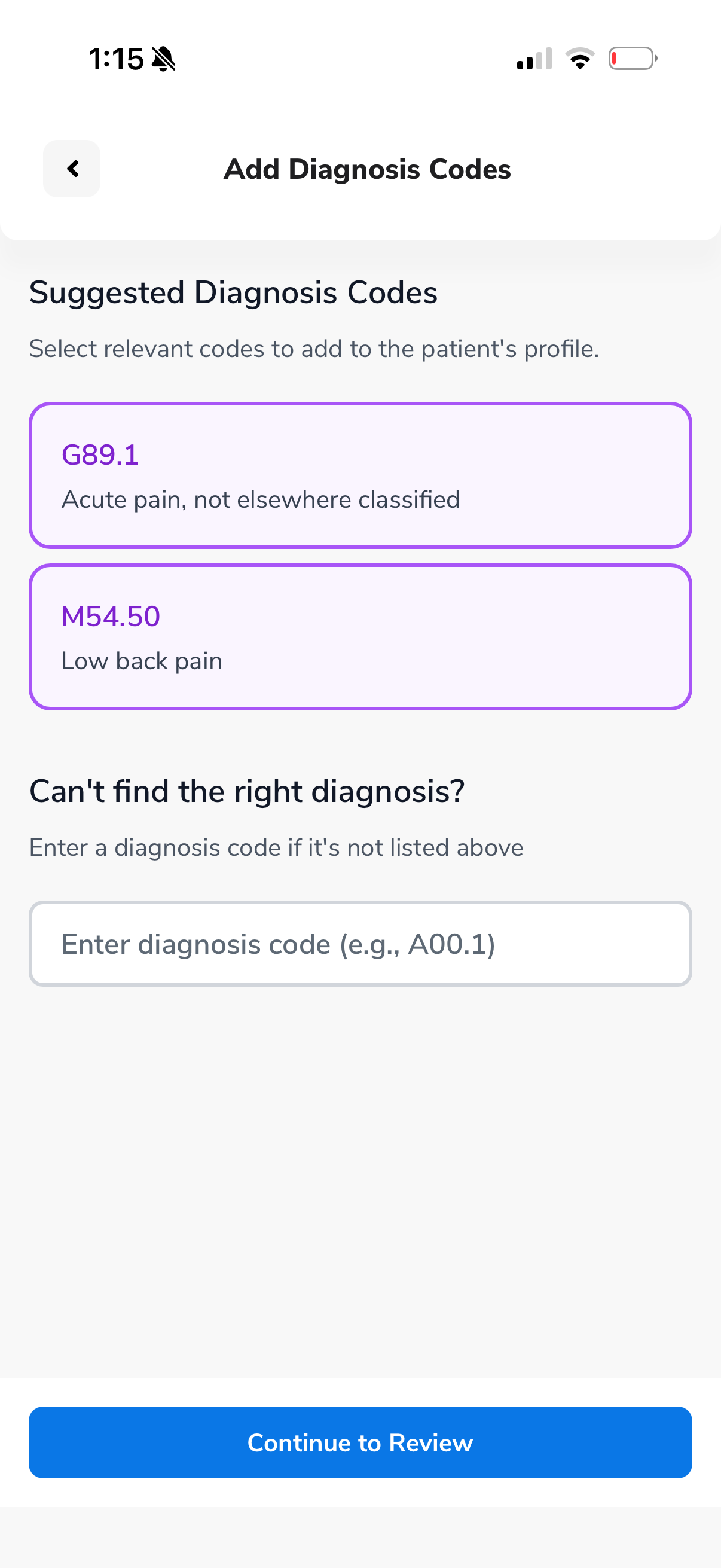
AI suggests the right diagnosis codes
Based on your answers and narrative, the AI suggests relevant ICD-10 diagnosis codes. Just tap to select - or enter a code manually if needed.
You're always in control - the AI just suggests, you decide.
Cross-validation catches mistakes
Every answer is checked against all other body systems and the medications list. If something doesn't match up, you'll get a friendly warning before you can continue.
Review needed: You selected Metoprolol 25mg in medications, which is typically prescribed for cardiac conditions - but no cardiac symptoms were noted in the Cardiovascular section. Would you like to review?
This means you literally can't make a mistake without the app catching it first.
Cross-referencing...
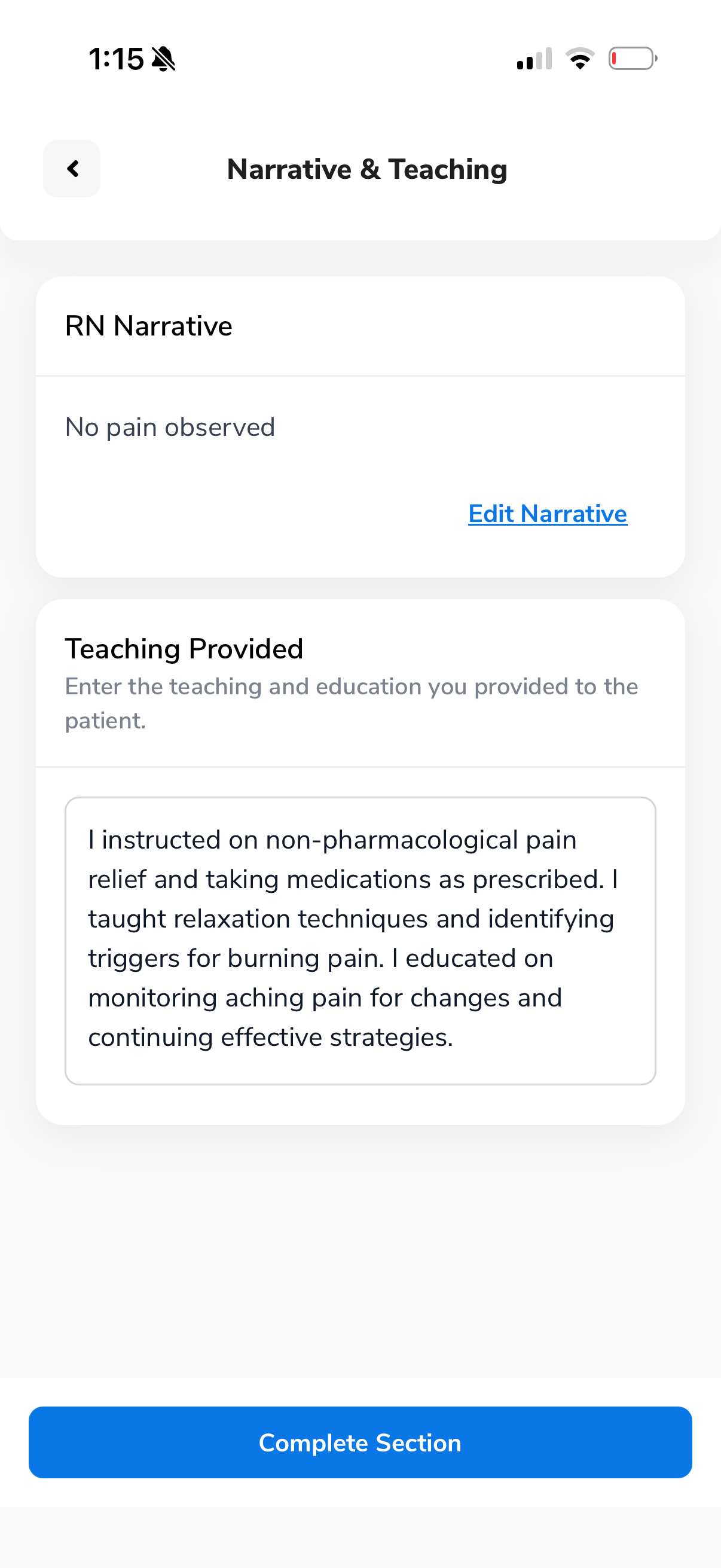
AI writes the patient teaching for you
Based on everything you documented - your answers, narrative, and diagnoses - the AI auto-generates comprehensive patient teaching text. You can review and edit before completing.
Teaching Provided
"I instructed on non-pharmacological pain relief and taking medications as prescribed. I taught relaxation techniques and identifying triggers for burning pain. I educated on monitoring aching pain for changes and continuing effective strategies."
The RN Co-Pilot does the heavy lifting
After you complete the medical history and medication steps, our AI engine has enough context to guide you through the rest with intelligent suggestions at every turn.
Diagnosis suggestions
AI suggests relevant diagnoses per section based on your answers and the medication list.
Cross-validation
Every answer is checked against all other sections and medications. Inconsistencies are flagged.
Auto patient teaching
Teaching content is generated from your findings - ready to be indicated to the patient.
Plan of Care
We've done 99% of the work for you. Answer a few patient questions, then let AI generate the rest.
Answer a few quick questions
The app shows you specific questions to ask the patient about their care needs.
Tap "Generate Plan of Care"
One button builds the entire plan - duties, frequencies, and requirements - based on the assessment data.
Review and submit
Edit if needed or keep as-is. Click submit when you're satisfied.
Generated Plan of Care
Built from your assessment data automatically
Supervisory Form
Verify that the patient's home health aide can perform the required duties.
This form walks you through the duties listed in the Plan of Care. For each one, you indicate whether the aide knows how to perform it or needs extra training.
You don't provide the training
If the aide needs extra training, the entity servicing the patient will handle it. You just indicate it in the form.
You'll also observe 2–3 tasks performed by the aide (like handwashing) and record your observations. Then submit the form.
Aide Competency Check
Observed Tasks
Sign, submit & clock out
Once all forms are done, you'll sign in the app and have the patient sign as well. Then hit submit - and clock out.
Your signature
Sign directly on the screen in the app
Patient signature
Hand the phone to the patient to sign
Submit & clock out
All documentation is uploaded automatically
RN Signature
Signed by RN
Patient Signature
Signed by Patient
Clocked out at 12:03 PM
InstaPay - Get paid fast
Our visits are paid instantly. We're working on moving to next-day payments, and soon, even same-day.
Once your visit is completed and submitted, your payment is processed. No waiting for bi-weekly cycles or chasing invoices.
Simple and transparent
Your pay rate is shown before you accept any visit. No surprises - what you see is what you get.
Latest payment
$110.00
Start of Care - 101 Bedford Ave
$680
This week
8
Visits done
$2.8K
This month
Chat & support
We're trying to be as responsive as possible. You have a built-in in-app chat to reach us anytime.
In-app chat
Reach out to us directly from the app. Ask questions, report issues, or get help with a visit.
Prefer texting? Reach us on WhatsApp for quick responses - especially before or after a visit.
Email support
For detailed questions or documentation requests, email us and we'll get back to you quickly.
Frequently asked questions
Common questions from RNs getting started with Task Health.
No! Our app guides you through the entire assessment with our AI Co-Pilot. Even if you've never done a home patient assessment before, you'll be able to complete it successfully with close to zero mistakes.
Not at all. You can do 1 visit a week or 15 - it's completely up to you and your schedule. There's no minimum commitment.
Most visits take between 45-60 minutes. The entire assessment process is done digitally through the app, which streamlines everything.
Payments are processed instantly after your visit is completed. We're working on moving to next-day deposits, and soon, same-day payments.
Depending on the visit type, you'll complete up to three forms: the Patient Assessment, the Plan of Care, and the Supervisory Form. Each one is guided step-by-step in the app.
No. Task Health visits are clinical assessments only - not direct patient care. You're assessing the patient's condition and documenting your findings. The care itself is provided by the home health aide through the agency.
It happens occasionally. If the patient refuses to be assessed, simply document the refusal in the app and clock out. You'll still be compensated for your travel time.
If you arrive and the patient isn't home, wait a few minutes and try calling them. If they don't show up, document the missed visit in the app and clock out. You'll be compensated for your travel time.
If the patient doesn't confirm your proposed time, we'll keep trying to reach them. If they're unreachable, we'll let you know and the visit will be reassigned or rescheduled. You're never left hanging.
You can leave it as N/A and explain in the narrative section that the patient was unable to provide the answer to the question. This is completely normal and happens regularly.
Yes. If you travel to a visit and it can't be completed (patient not home, patient refuses, etc.), you'll be compensated for your travel time.
After you complete a visit and clock out, your payment is processed instantly. The funds are available in the app right away and can be transferred to your bank account.
As many as you want! There's no cap. You can take 1 visit a week or 20 - it's entirely up to your availability. New cases are posted in the app daily.
Ready to take your first visit?
You've got everything you need. Open the app, pick a visit, and let the Co-Pilot guide you through.