For Our Agency Partners
How We Deliver Clinically Bulletproof Assessments
An inside look at the AI-powered process behind every Task Health patient assessment - and why it produces consistently exceptional documentation.
Design principle: The RN remains the clinical author. AI assists with structure, suggestions, and real-time validation.
Assessment Quality, Reinvented
The RN Co-Pilot is an AI-powered clinical companion that guides registered nurses through every section of a patient assessment in real time. It doesn't replace clinical judgment - it reinforces it with structured workflows, contextual prompts, and multi-layer validation.
The Challenge with Traditional Assessments
Inconsistent quality across visits
Documentation quality varies by nurse experience, fatigue, and patient complexity. Agencies can’t guarantee a consistent clinical standard across every visit.
Errors caught too late to fix cheaply
Traditional review happens after submission — errors discovered days later mean costly rework, delayed billing, and compliance exposure.
Missing clinical connections between sections
Medications, diagnoses, and narrative findings often live in silos. Without cross-referencing, critical gaps slip through undetected.
The Assessment - Step by Step
This is the core of every visit. The entire process is guided, works in order, and is done digitally in the app.
Even if you've never done a home assessment before
Using our app, you will be able to complete the entire assessment successfully - with close to zero mistakes. The AI Co-Pilot guides you through every step.
Your forms dashboard
You'll see the list of required forms. Tap each one to start - progress is tracked automatically.
Required Forms
Patient Assessment
7 sections · ~35 min
Plan of Care
AI-generated · ~5 min
Supervisory Form
Aide observation · ~10 min
Progress
Section 3 of 7
Vital Signs
Step 1 - Medical History & Medications
Start by asking the patient about their general medical history. Then photograph their medications - our AI does the rest.
Medical History
Ask the patient about conditions, prior surgeries, and allergies.
Photo Medications
Snap photos of all medications with your phone. Upload them in the app.
AI Recognizes Meds
The app identifies each medication and suggests matching diagnoses.
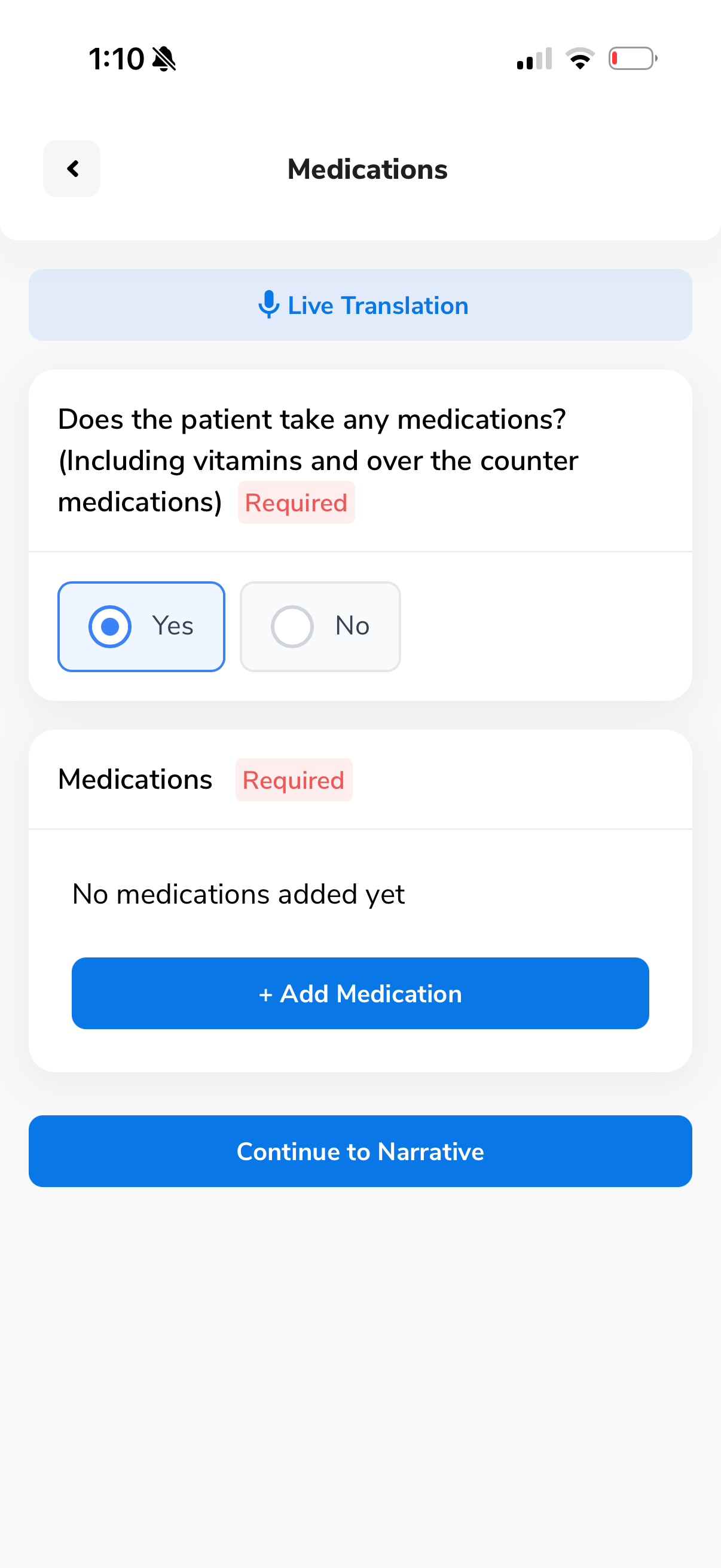
Ask about their medical history
The app walks you through structured questions about the patient's conditions, medications, and medical background. Everything is guided - just follow the prompts.
Voice-to-text built in
Tap the mic icon to dictate - no typing needed
Live Translation
Real-time translation for non-English speaking patients
Photograph the patient's medications
Simply snap photos of all medication bottles. The app will automatically extract each medication name, dose, and frequency using AI.
Just point and shoot
No manual data entry. Our AI reads the labels and fills in everything for you - medication name, dosage, and form.
metFORMIN
500 mg TabFrequency
Twice daily
Route
Oral
Administration Notes
Take with food
Lisinopril
10 mg TabFrequency
Once daily
Route
Oral
Administration Notes
Take in the morning
Atorvastatin
20 mg TabFrequency
Once daily
Route
Oral
Administration Notes
Take at bedtime
AI extracts all medications instantly
From a single photo, the AI identifies every medication and automatically fills in the name, dosage, frequency, route, and administration notes - for all medications at once.
Zero manual data entry
No searching, no typing, no selecting doses. The AI handles all of it from the photo alone.
Just confirm the diagnosis - AI suggests it
The only thing left to do per medication is select the ICD diagnosis code. The AI auto-suggests the right one - just tap to confirm. Once all diagnoses are set, the medication step is complete.
AI auto-suggests ICD codes
For metFORMIN → E11.9 - Type 2 diabetes mellitus
For Lisinopril → I10 - Essential hypertension
For Atorvastatin → E78.5 - Hyperlipidemia
Everything connects
These diagnosis codes are used later by the AI to cross-validate your body systems assessment. It all links together automatically.
metFORMIN
500 mgLisinopril
10 mgAtorvastatin
20 mgStep 2 - Body Systems Assessment
For each body system (Cardiovascular, Respiratory, Neurological, etc.), you follow the same guided loop:
Answer Questions
Select from guided options shown in the app
Add Narrative
Speak freely - the app converts voice to text
AI Diagnosis
We suggest diagnoses based on your answers
Validation
Cross-referenced against all sections & meds
Teaching
AI writes patient teaching based on your findings
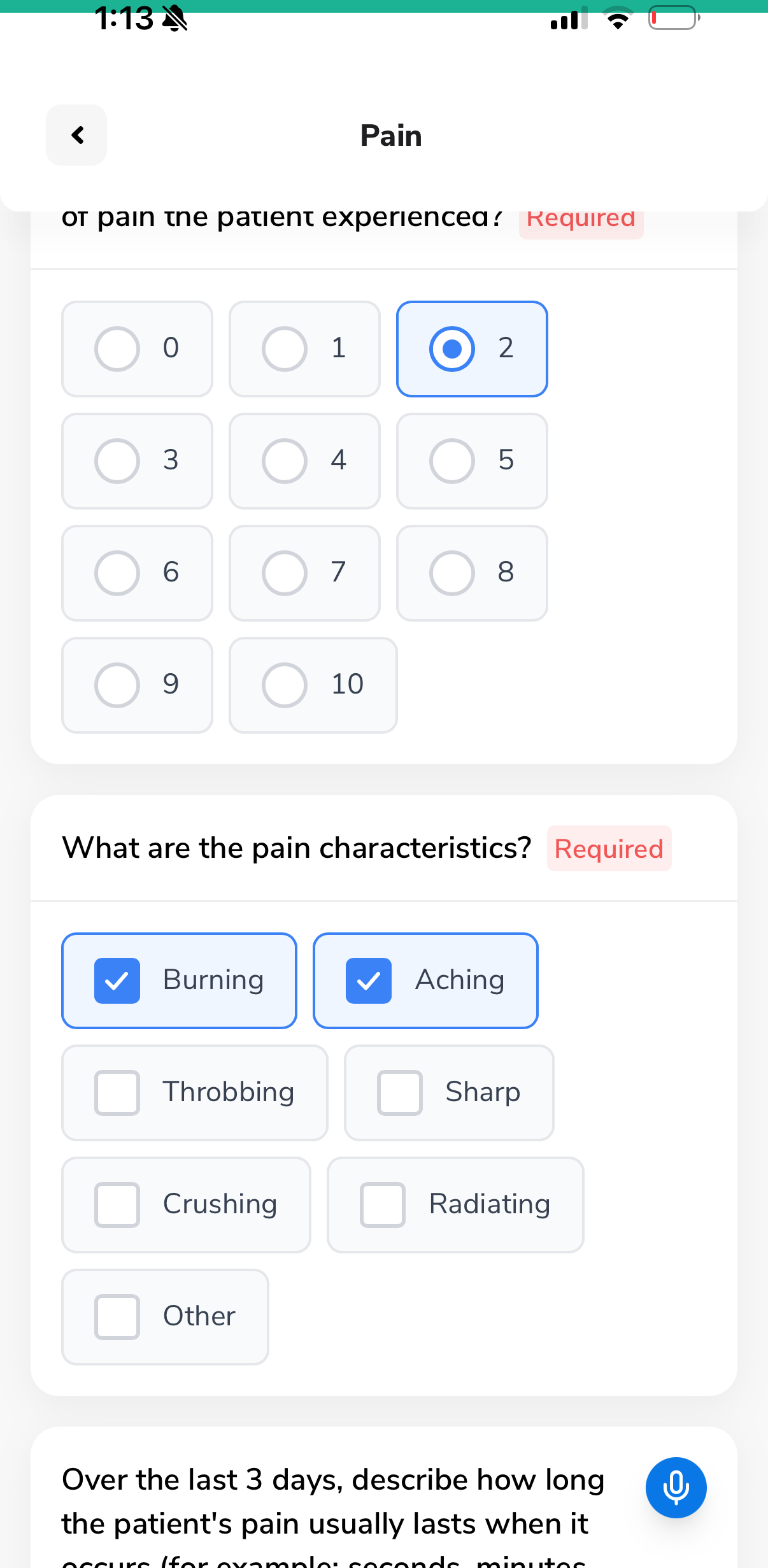
Guided clinical questions
Each body system section presents structured questions - radio buttons, checkboxes, pain scales, and free-text fields with voice-to-text. Just follow the prompts.
No guesswork
Every question is pre-built by clinical experts - you just answer
Voice-to-text everywhere
Tap the mic icon on any text field to dictate instead of type
Tell the story in your own words
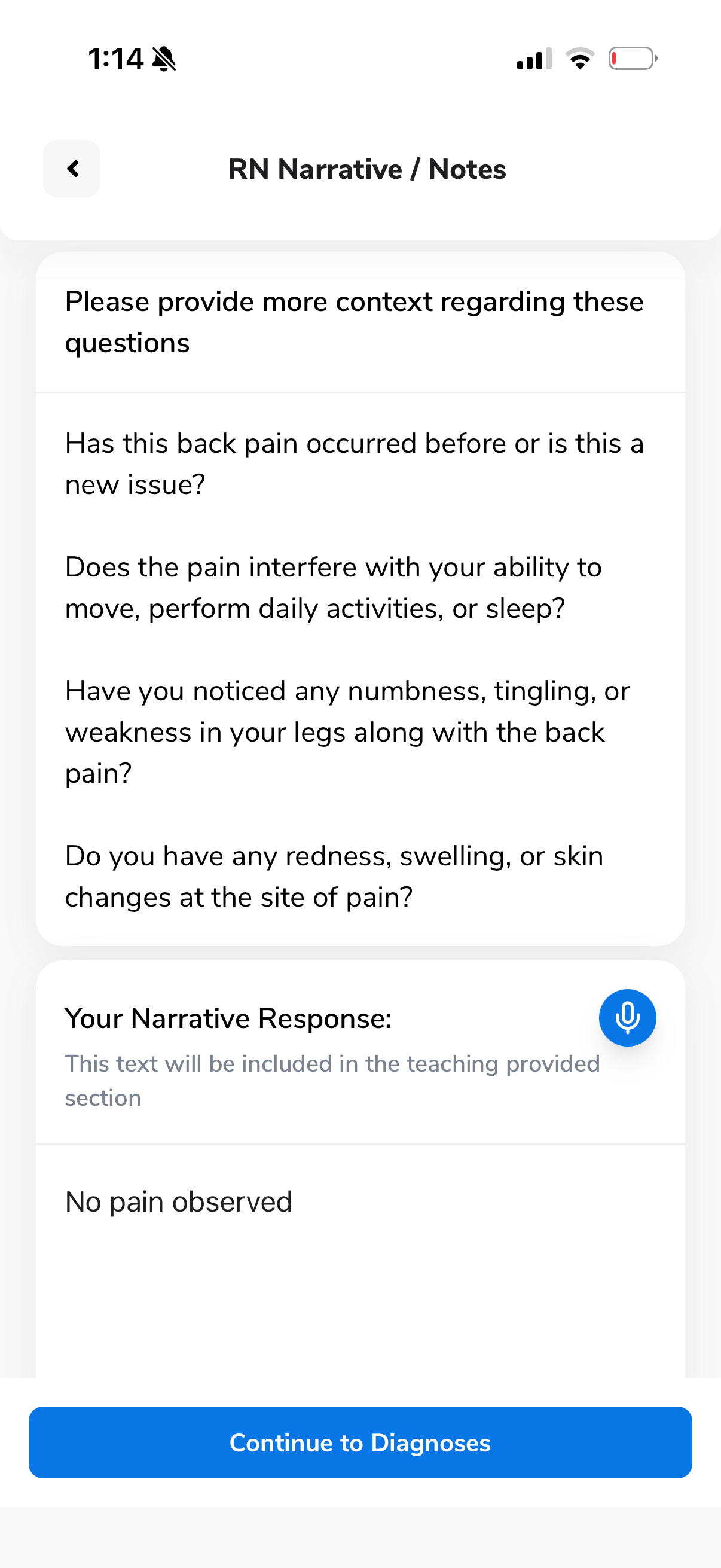
After answering the structured questions, the app asks follow-up questions to help you provide more clinical context. Speak your narrative - the app transcribes it in real time.
Your Narrative Response
This text will be included in the teaching provided section
"No pain observed"
Tap to record - voice is transcribed instantly
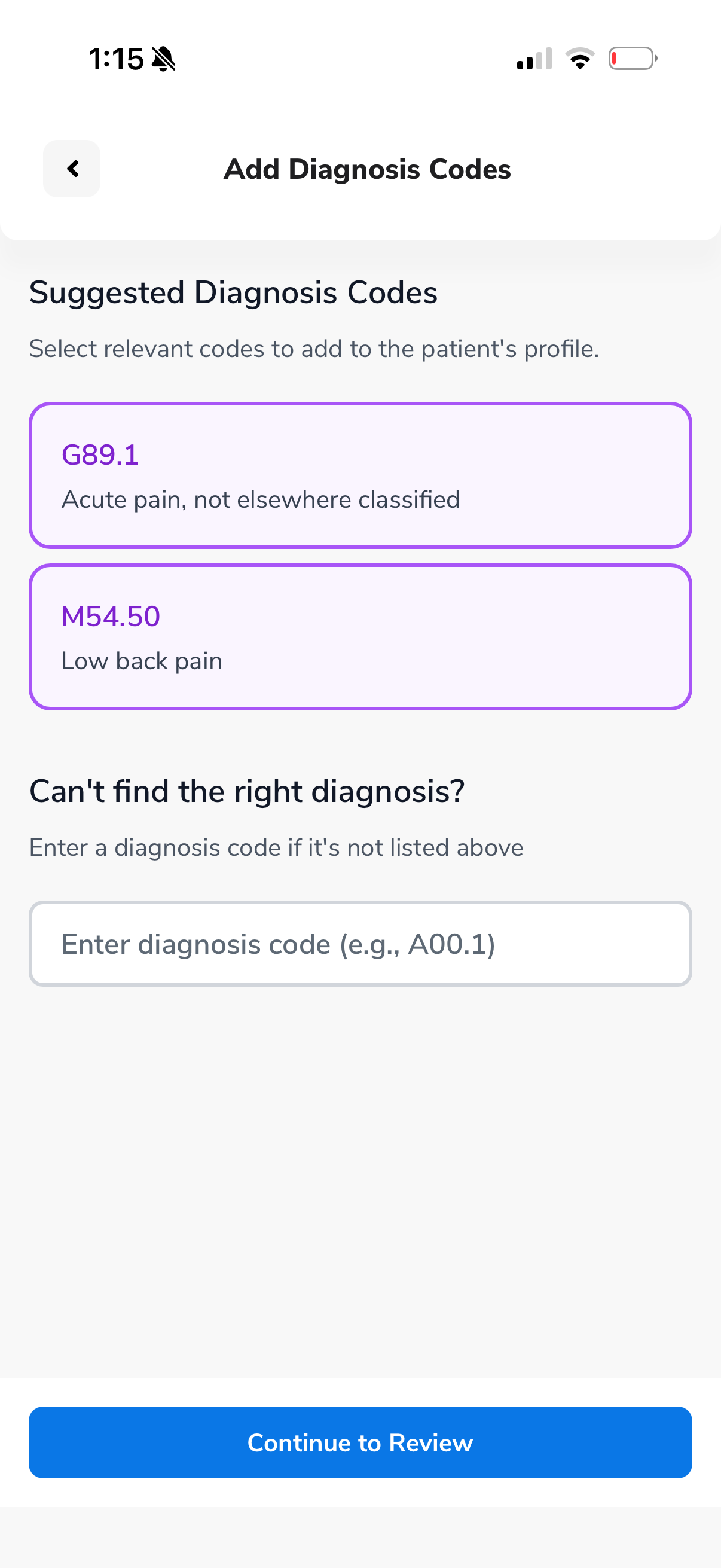
AI suggests the right diagnosis codes
Based on your answers and narrative, the AI suggests relevant ICD-10 diagnosis codes. Just tap to select - or enter a code manually if needed.
You're always in control - the AI just suggests, you decide.
Cross-validation catches mistakes
Every answer is checked against all other body systems and the medications list. If something doesn't match up, you'll get a friendly warning before you can continue.
Review needed: You selected Metoprolol 25mg in medications, which is typically prescribed for cardiac conditions - but no cardiac symptoms were noted in the Cardiovascular section. Would you like to review?
This means you literally can't make a mistake without the app catching it first.
Cross-referencing...
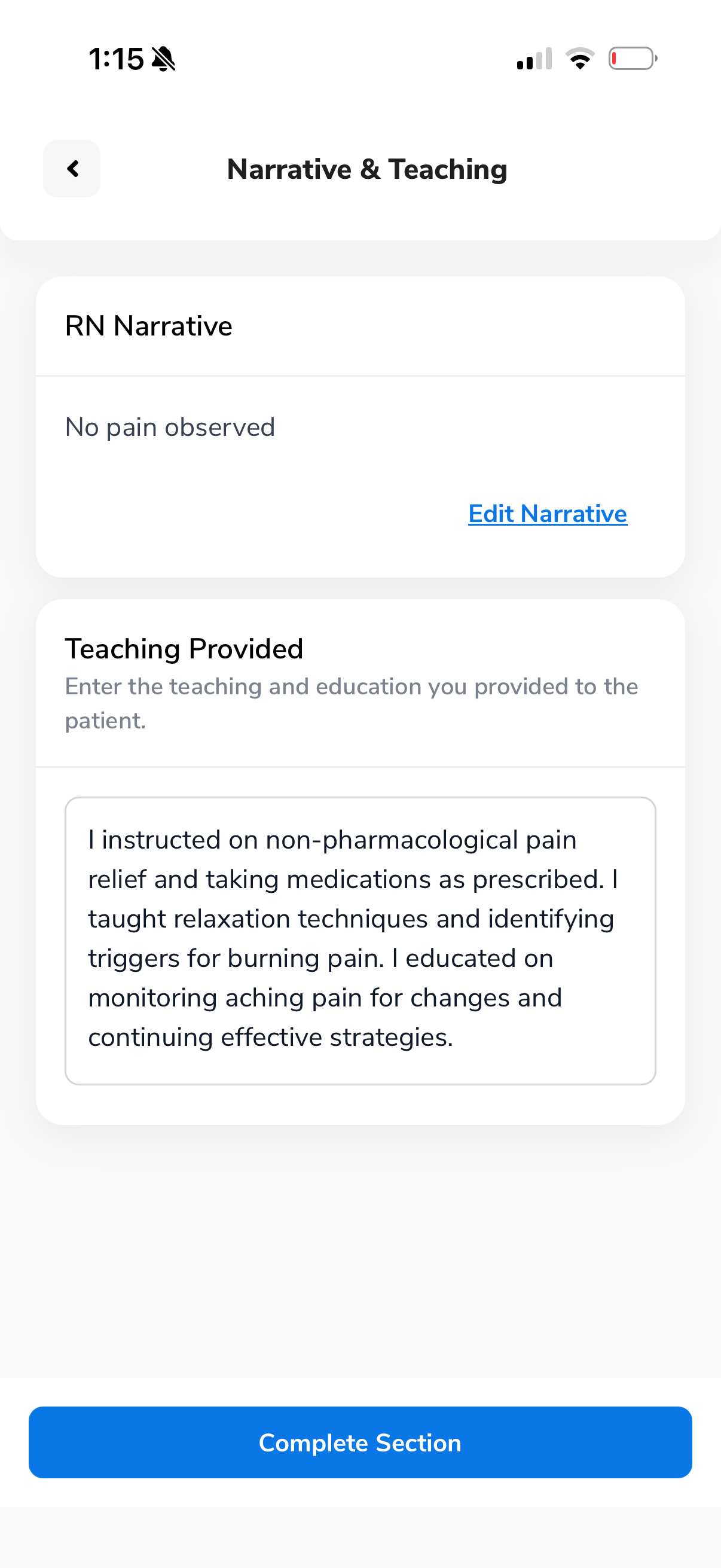
AI writes the patient teaching for you
Based on everything you documented - your answers, narrative, and diagnoses - the AI auto-generates comprehensive patient teaching text. You can review and edit before completing.
Teaching Provided
"I instructed on non-pharmacological pain relief and taking medications as prescribed. I taught relaxation techniques and identifying triggers for burning pain. I educated on monitoring aching pain for changes and continuing effective strategies."
The RN Co-Pilot does the heavy lifting
After you complete the medical history and medication steps, our AI engine has enough context to guide you through the rest with intelligent suggestions at every turn.
Diagnosis suggestions
AI suggests relevant diagnoses per section based on your answers and the medication list.
Cross-validation
Every answer is checked against all other sections and medications. Inconsistencies are flagged.
Auto patient teaching
Teaching content is generated from your findings - ready to be indicated to the patient.
Plan of Care
We've done 99% of the work for you. Answer a few patient questions, then let AI generate the rest.
Answer a few quick questions
The app shows you specific questions to ask the patient about their care needs.
Tap "Generate Plan of Care"
One button builds the entire plan - duties, frequencies, and requirements - based on the assessment data.
Review and submit
Edit if needed or keep as-is. Click submit when you're satisfied.
Generated Plan of Care
Built from your assessment data automatically
How the RN Co-Pilot Works
Three phases, one seamless workflow. Build context first, then guide and validate each section in real time.
Foundation
Vitals, medications, and medical history build the patient context backbone.
Body Systems
5-step AI-guided workflow repeats for every clinical section.
Final Review
Full cross-assessment AI validation before submission.
Phase 1 - Foundation
Building Complete Clinical Context
Before any body system is assessed, the Co-Pilot builds a comprehensive patient context backbone - vitals, medications, and medical history that power every downstream validation.
What gets captured
- Vitals
Baseline clinical snapshot stored as context for later cross-checks
- Medications
AI photo recognition extracts and structures the med list; each med is linked to an indication
- Medical History
Free-text history parsed into a consolidated diagnosis list
5-step workflow per body system
- Structured clinical questions for this section
- Context-aware narrative guidance
- AI-suggested diagnoses — RN confirms
- Real-time validation against meds & history
- Personalized patient teaching, ready for review
Phase 2 - Body Systems
AI-Assisted, Section-by-Section Assessment
The same structured 5-step workflow runs inside every body system. Real-time validation catches issues while the RN is still in the section - not after submission.
Phase 3 - Final Review
Comprehensive Assessment Validation
Before submission, the Co-Pilot runs a full cross-assessment AI validation - checking every section against every other section for completeness and consistency.
Validation checks
- Within-section completeness — missing details, contradictions
- Cross-section consistency — conflicts between body systems
- Medication / history alignment — chart reflects documented meds
- Narrative vs. selections — written text matches structured data
Phase 2 Deep Dive
Inside the 5-Step Workflow
Every body system follows the same micro-workflow. Flags are resolved while you’re still in the section.
Questions
Section-specific clinical findings captured through structured prompts.
Narrative
Co-Pilot generates context-aware guidance based on findings and patient history.
Diagnoses
AI-suggested diagnoses relevant to this body system — RN confirms what applies.
AI Review
Immediate validation flags gaps, contradictions, and cross-checks against meds/history.
Teaching
AI-drafted patient teaching for this section — RN reviews, edits, and accepts.
Key insight: The medication context captured in Phase 1 powers every downstream validation. When the Co-Pilot flags a gap in the Cardiopulmonary section, it's cross-referencing against the patient's actual medication list - not a generic checklist.
What This Means for Your Agency
Clinically defensible files
Every assessment is cross-validated against medications, diagnoses, and history — producing documentation that stands up to audit.
Audit-ready from day one
Near-zero error rate
Dual-layer AI validation — within each section plus full cross-assessment review — catches inconsistencies before submission.
~0 target error rate
Consistent quality, every visit
The same structured workflow runs for every nurse, every patient, every visit — eliminating variability.
Standardized across all visits
Faster turnaround
Real-time guidance and validation means assessments are complete and correct the first time — no rework cycles.
Fewer returns and corrections
Full clinical alignment
Medications, diagnoses, vitals, and narrative findings are cross-referenced throughout — nothing exists in isolation.
Connected clinical picture
Built-in patient teaching
AI drafts personalized, section-specific patient education — clinically accurate and ready for RN review.
Teaching included, not bolted on
Comprehensive Clinical Coverage
Body Systems
Additional Sections
Every section gets the full workflow
Each body system runs through the complete 5-step workflow - structured questions, AI-guided narrative, diagnosis suggestions, real-time validation, and patient teaching. Nothing is skipped, nothing is left to chance.
The Result
Assessment Quality You Can Trust
Three principles that make every Task Health assessment clinically defensible.
Context-Aware AI
Every prompt, suggestion, and validation is powered by the patient’s actual medications, diagnoses, and clinical history.
Multi-Layer Validation
Dual-layer review — real-time within each section, then a comprehensive cross-assessment sweep before submission.
Clinically Bulletproof
The result: documentation that is complete, consistent, cross-validated, and audit-ready from the moment it’s submitted.
The Task Health Standard
See the Co-Pilot in action
Every assessment we deliver has passed through this process - AI-guided, multi-layer validated, and clinically reviewed. Schedule a walkthrough to see it yourself.